What Direct Lake Is and Why It Matters#
Direct Lake is a semantic-model storage mode in which the model reads Delta tables straight from OneLake, avoiding both a data import and a DirectQuery round trip, and so pairs import-like performance with DirectQuery-like freshness [S1]. It sits in the Analysis Services engine that underpins Power BI, alongside the existing Import and DirectQuery modes, letting semantic models read Delta Parquet data directly from OneLake without maintaining a copied dataset [S2]. For the people building reports, the practical effect is that visuals query data sitting in OneLake without ever importing it into the model or keeping a separate cache [S3].
Before Direct Lake, practitioners lived with a hard trade-off. Import mode is fast because the engine's in-memory store already holds every value it needs, but it goes stale between scheduled refreshes, and those refreshes copy potentially large datasets end to end. DirectQuery stays fresh because every visual issues a live query, but that adds a round trip to every render and typically costs performance. Direct Lake collapses that choice: the Parquet files a Fabric lakehouse or warehouse already writes to OneLake become the live source for Power BI, with no secondary copy to build or refresh on a schedule.
Direct Lake pairs import-like performance with DirectQuery-like freshness [S1].
That combination is why Direct Lake matters operationally, not just architecturally: teams that used to choose between "fast" and "fresh" for a given dataset no longer have to, as long as their Delta tables are written in a way the engine can load efficiently — which is where the internals below start to matter for real workloads.
Two Flavors: Direct Lake on OneLake vs. Direct Lake on SQL#
Direct Lake comes in two storage-mode flavors, and the choice between them is an early architectural decision, not a cosmetic setting [S4]. Direct Lake on OneLake points the model's shared expression straight at the OneLake storage location; OneLake security, richer modelling features, and faster queries are the draw [S4]. Direct Lake on SQL points the shared expression at the SQL analytics endpoint instead, which the engine consults only for schema and security discovery — actual data is still read straight from OneLake unless the query falls back to DirectQuery [S4]. Direct Lake on SQL earns its keep when SQL-endpoint security rules are needed under delegated identity, or when DirectQuery fallback must remain available [S4].
Tooling nudges you toward one flavor by default: Power BI Desktop and the Power BI service create only Direct Lake on OneLake models. The SQL analytics endpoint page is the one creation path that offers a choice between both flavors, and when you create a model there, the type dialog defaults to Direct Lake on OneLake if the endpoint runs in user identity mode, and to Direct Lake on SQL if it runs in delegated identity mode [S4].
| Direct Lake on OneLake | Direct Lake on SQL | |
|---|---|---|
| Data source | Reads OneLake directly, no SQL endpoint involved [S4] | SQL analytics endpoint for schema/security discovery only [S4] |
| DirectQuery fallback | Never falls back [S5] | Falls back on documented triggers [S5] |
| Security model | OneLake security | SQL-endpoint security rules under delegated identity [S4] |
| Default creation path | Power BI Desktop and service [S4] | SQL analytics endpoint page (delegated identity default) [S4] |
You can tell the two apart from the tooling itself. In TMDL view, Direct Lake on OneLake's M expression uses the Azure Data Lake Storage connector, while Direct Lake on SQL uses the SQL Server or OneLake.SqlAnalytics connector [S4]. Over XMLA, any Direct Lake model — either flavor — shows a database compatibilityLevel of 1604 or higher, partitions whose mode is directLake, and partitions that reference a shared expression as their data source [S4].
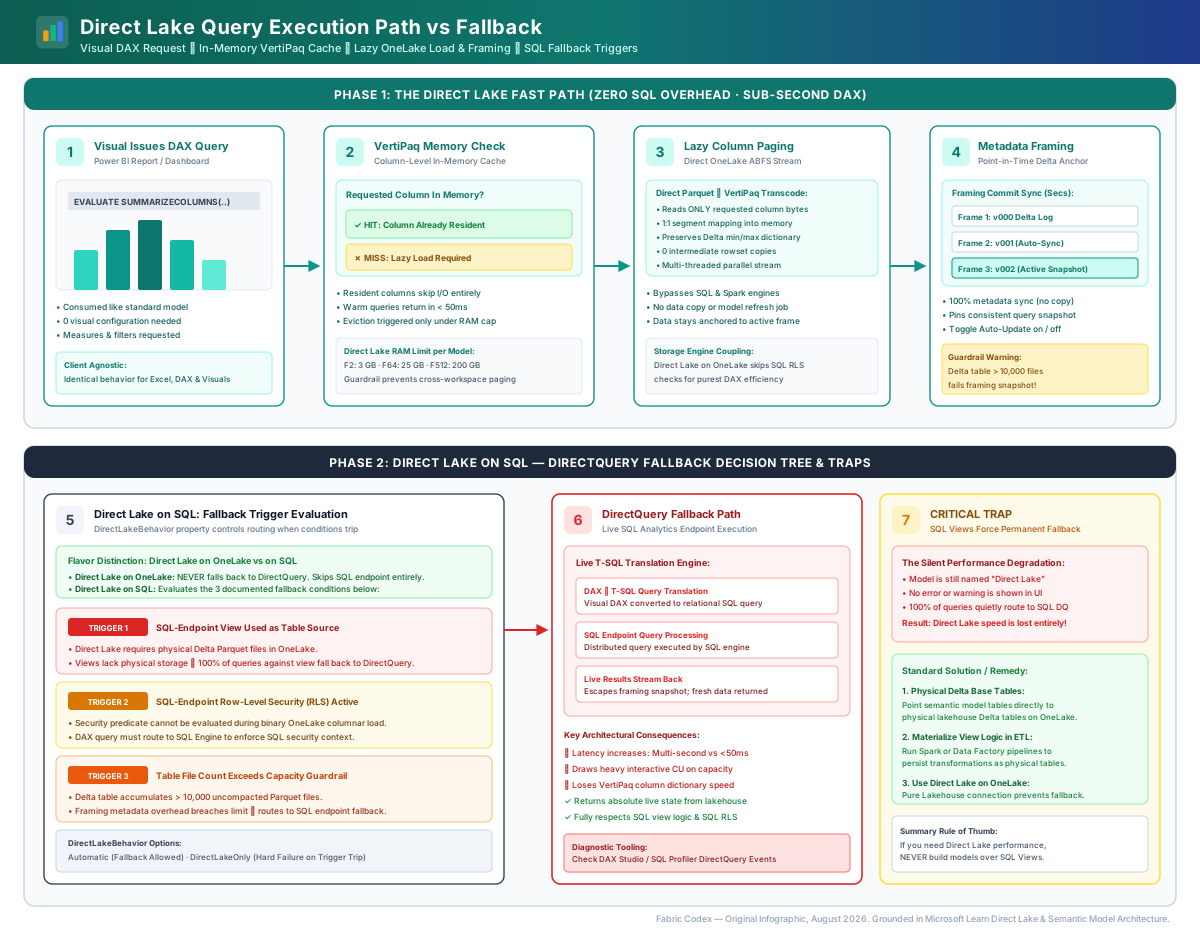
Lazy Loading and Framing#
Direct Lake does not preload a model the way Import mode does. Column data loads from OneLake lazily: nothing is read until a query first touches a column, and the load set includes not just the columns a query names but also the columns needed by relationships and measures [S5]. Once loaded, a column can stay resident in an in-memory cache to serve subsequent queries efficiently [S7].
That resident state is anchored to a specific point in time by framing. Framing is a metadata-only operation that typically finishes in seconds: the model reads the latest Delta table version and rebinds itself to the current Parquet file set, establishing the new baseline for future column loading [S5]. Because of this, Direct Lake queries reflect the Delta table state as of the most recent successful framing operation, not the live table — writes landing after the last frame stay invisible until the next one runs [S5]. An automatic-updates model setting, on by default, reframes tables whenever the underlying OneLake data changes; turning it off gives you manual or scheduled control over exactly when new data becomes visible [S5].
Framing can fail outright if a Delta table breaches capacity guardrails — for example, exceeding 10,000 Parquet files in a single table [S5].
Working with framing deliberately#
Pin queries to a framing point during in-flight ETL. The rule: disable automatic updates and frame manually when the underlying Delta data is transient. The why: mid-ETL, a table can pass through several intermediate, inconsistent states before a load finishes, and automatic reframing would expose those states to report users [S5]. A concrete before/after:
# Before: automatic updates on (default) - every OneLake write reframes the model
model.automaticUpdates = true

# After: disable automatic updates for the duration of a multi-step load,
# then frame once, deliberately, after the last step commits
model.automaticUpdates = false
... run multi-step ETL that writes several intermediate Delta versions ...
refreshDataset(model, mode="framing-only")   # single deliberate reframe
model.automaticUpdates = true                 # restore default behavior
Inference: the specific API calls above (automaticUpdates, refreshDataset(mode="framing-only")) are illustrative pseudocode for the pattern the claim describes, not a literal documented API surface — the underlying rule (disable automatic updates, frame deliberately once the load is consistent) is grounded in [S5].
DirectQuery fallback - Direct Lake on SQL only#
DirectQuery fallback exists only in Direct Lake on SQL; Direct Lake on OneLake never falls back and skips SQL-endpoint coupling entirely, which enables more efficient DAX query plans since no SQL security check is needed [S5]. Documented fallback triggers for Direct Lake on SQL are: querying a SQL-endpoint view, querying a table with SQL-endpoint row-level security, and a Delta table exceeding capacity guardrails [S5]. A fallen-back query reads the SQL analytics endpoint directly, so it returns the latest data and escapes the framing point-in-time snapshot — at the cost of typically slower performance [S5]. Which behavior applies is governed by the model's DirectLakeBehavior property; that property has no effect on Direct Lake on OneLake models, which simply never fall back [S5].
Best Practices#
Default to Direct Lake on OneLake. The rule: unless you have a specific reason to need SQL-endpoint security or DirectQuery fallback, build on OneLake. The why: it delivers OneLake security, richer modelling features, and faster queries, and it never pays the DAX-plan overhead of a SQL security check [S4] [S5]. Right/wrong:
# Wrong: creating from the SQL analytics endpoint out of habit, landing on
# Direct Lake on SQL under a delegated-identity endpoint by default
Create model from: SQL analytics endpoint (delegated identity) -> Direct Lake on SQL

# Right: create from Power BI Desktop or the Power BI service, which only
# ever produces Direct Lake on OneLake
Create model from: Power BI service -> Direct Lake on OneLake
Avoid SQL views as the table source in Direct Lake on SQL. The rule: base Direct Lake on SQL tables on base tables, not views. The why: basing a table on a SQL view forces every query against that table into DirectQuery fallback, which usually slows it down [S4]. Right/wrong:
-- Wrong: model table backed by a view — forces DirectQuery fallback on every query
CREATE VIEW dbo.vw_sales_enriched AS
  SELECT s.*, c.region_name
  FROM sales s JOIN customer_region c ON s.region_id = c.region_id;
-- model table bound to dbo.vw_sales_enriched

-- Right: materialize the join upstream (e.g. in the lakehouse) into a base
-- Delta table, and bind the model table to that instead
CREATE TABLE dbo.sales_enriched AS
  SELECT s.*, c.region_name
  FROM sales s JOIN customer_region c ON s.region_id = c.region_id;
-- model table bound to dbo.sales_enriched (a base table, not a view)
Use low-cardinality partition columns. The rule: partition Delta tables only on columns with roughly under 100-200 distinct values. The why: over-partitioning multiplies small Parquet files and row groups, which inflates segment counts in the model and degrades query performance [S6]. Right/wrong:
# Wrong: partitioning on a near-unique column explodes file/row-group count
df.write.format("delta").partitionBy("customer_id").save(path)   # thousands of distinct values

# Right: partition on a genuinely low-cardinality dimension
df.write.format("delta").partitionBy("sales_region").save(path)  # e.g. 12 distinct values
Target larger Parquet files with Optimized Write. The rule: use a 1 GB BinSize target when writing Delta tables that back Direct Lake semantic models. The why: larger files align with the Direct Lake loading pattern and reduce the number of segment loads needed [S10]. Right/wrong:
# Wrong: default small-file writes, many tiny row groups per table
spark.conf.set("spark.microsoft.delta.optimizeWrite.enabled", "false")

# Right: enable Optimized Write with a 1 GB BinSize target for Direct Lake sources
spark.conf.set("spark.microsoft.delta.optimizeWrite.enabled", "true")
spark.conf.set("spark.microsoft.delta.optimizeWrite.binSize", "1073741824")  # 1 GB
Check network posture before you deploy. The rule: don't enable Block Public Internet Access on a tenant that depends on Direct Lake. The why: Direct Lake connections fail outright when that tenant setting is active, because Direct Lake models must route through public endpoints — making it incompatible with the most restrictive Fabric network isolation posture [S9]. (Inference: this is a tenant-level go/no-go check, not a per-model setting — verify it once, before rollout, rather than per report.)
What goes wrong#
Overwrite writes defeat incremental framing. Loading a Delta table with the Overwrite option wipes the table's commit history. That defeats incremental framing and forces a full cold-state reload of every segment, dictionary, and join index on the next query [S6]. Prefer append or merge patterns that preserve history for tables backing Direct Lake models.
Aggressive vacuuming breaks in-flight queries. A framed Direct Lake model is pinned to a specific Delta commit version. If a vacuum job removes the Parquet files behind that version before the next reframe runs, user queries fail when the referenced files are gone [S6]. Keep vacuum retention windows longer than your framing cadence.
Internals#
Architecture & design#
At the architecture level, Direct Lake is defined by what it doesn't do: no ETL pipeline copies data into the model, and no live SQL round trip serves every visual. Instead the shared expression inside the semantic model points either straight at OneLake storage (Direct Lake on OneLake) or at the SQL analytics endpoint for discovery purposes only (Direct Lake on SQL), with the underlying engine performing on-demand column loading against OneLake in both cases [S4].
This makes the SQL analytics endpoint architecturally optional for the OneLake flavor: OneLake APIs alone handle schema discovery, security checks, and data loading with no SQL endpoint involved [S4]. In the SQL flavor, the endpoint stays in the metadata path only — actual data still comes from OneLake, unless a query falls back to DirectQuery [S4]. That asymmetry is why Direct Lake on OneLake can build simpler, faster DAX query plans: there's one fewer security boundary to cross on every query [S5].

How it works internally#
Direct Lake's query performance hinges on transcoding — converting Parquet-encoded column data into the in-memory columnar format the DAX engine actually queries against. A model occupies one of four memory-residency states — cold, semiwarm, warm, or hot — with query latency improving at each step; the hot state adds populated VertiScan caches on top of fully resident column data [S6].
On a cold-state query, the engine must merge the per-row-group local Parquet dictionaries of every needed column into a single global VertiPaq dictionary, so a Delta table with more row groups takes longer to transcode [S6]. Transcoding itself is usually a direct ID remap when both sides use RLE/Bit-Packing hybrid encoding; if a Parquet file used plain or delta encoding instead, Direct Lake has to re-encode the values outright, which slows column loading [S6]. V-Order compounds this in two ways: it raises RLE compression quality so columns stream into memory faster during transcoding, and it lets VertiScan compute results directly on compressed data without a decompression step at all [S6].
Row-group structure maps directly onto the in-memory model: the total row-group count across a Delta table's Parquet files maps one-to-one to the number of segments per column, so many tiny row groups produce many tiny segments and hurt performance [S6]. For large tables the engine prefers segments of roughly 1 to 16 million rows; row groups well under 1 million rows are the failure mode to avoid [S6].
A cold multi-table DAX query adds more work still: the engine must build join indexes from relationship key columns — loading their dictionaries plus the one-side key segments — and load any Delta deletion vectors so deleted rows are excluded from results [S6]. Notably, Direct Lake does not use Delta or Parquet statistics for row-group or file skipping when loading column data, so pruning optimizations that speed up other engines don't reduce its transcoding work [S6].
Once data is loaded, three things can evict a resident column: a framing operation triggered by a change to the source Delta table, prolonged non-use by queries, or general memory pressure on the capacity from concurrent operations [S5]. Incremental framing is deliberately cheap where it can be: the engine reads each table's Delta log and evicts only the column segments tied to removed row groups, while dictionaries are kept and merely extended with new values — avoiding a full re-transcode [S6].
Performance characteristics#
The performance-relevant numbers that are actually verified in the knowledge base are structural guardrails and sizing targets, not throughput or latency benchmarks: guidance targets Delta partition columns under roughly 100-200 distinct values to avoid over-partitioning [S6]; large tables perform best with column segments of roughly 1-16 million rows, with segments well under 1 million rows degrading performance [S6]; a 1 GB Optimized Write BinSize target is the recommended file size for tables backing Direct Lake models [S10]; and framing operations fail outright once a table exceeds 10,000 Parquet files [S5].
Coming soon — quantified latency/throughput benchmarks (e.g. measured cold-vs-hot query times, transcoding throughput numbers) aren't in the knowledge base yet. It needs an L4/L5 source such as a Microsoft engineering blog or conference talk publishing Direct Lake benchmark numbers, or a VertiPaq/Direct Lake internals deep-dive with measured results. Tracked in content/queue.md.
Worked Example#
Consider a data engineering team loading daily sales data from an external system into a Fabric lakehouse, with a Power BI semantic model over it for daily reporting.
1. The write side is tuned for Direct Lake from the start. The ingestion pipeline uses Optimized Write targeting a 1 GB BinSize [S10], and the Delta table is partitioned by sales_region, a column with 12 distinct values — comfortably under the 100-200 guidance [S6]:
spark.conf.set("spark.microsoft.delta.optimizeWrite.enabled", "true")
spark.conf.set("spark.microsoft.delta.optimizeWrite.binSize", "1073741824")

(df.write
   .format("delta")
   .mode("append")                 # never overwrite — preserves commit history
   .partitionBy("sales_region")    # 12 distinct values
   .save("Tables/sales_daily"))
2. The semantic model is built as Direct Lake on OneLake, created from the Power BI service (the default creation path for that flavor), with automatic updates left on [S4] [S5]. As each pipeline run completes and commits new Parquet files, framing triggers automatically and rebinds the model to the new Delta commit version within seconds [S5].
3. Security rides on OneLake, not SQL. Because the model is Direct Lake on OneLake rather than Direct Lake on SQL, OneLake workspace roles govern data access directly and no SQL analytics endpoint row-level security layer is involved [S4] [S5].
// Illustrative TMSL fragment showing what a Direct Lake on OneLake partition
// looks like once created — compatibilityLevel 1604+, mode "directLake",
// shared expression referencing OneLake, no SQL analytics endpoint connector
{
  "compatibilityLevel": 1604,
  "model": {
    "tables": [{
      "name": "sales_daily",
      "partitions": [{
        "mode": "directLake",
        "source": { "type": "m", "expression": "Shared_OneLake_Source" }
      }]
    }]
  }
}
Inference: the JSON above illustrates the shape of a Direct Lake TMSL definition based on the documented XMLA fingerprint (compatibilityLevel 1604+, directLake partition mode, shared-expression source) [S4] — it is not a literal file reproduced from a source.
4. Before rollout, the team confirms Block Public Internet Access is not enabled on the tenant, since that setting would sever the Direct Lake connection entirely [S9]. Report users see fresh sales data every morning with no scheduled dataset refresh to manage — framing, not a refresh job, is what keeps the model current.