Goal#
Serve interactive Power BI reports over a Fabric lakehouse without copying or refreshing data into an import model, while staying inside one capacity's limits.
Architecture#
1. Storage: OneLake + Lakehouse#
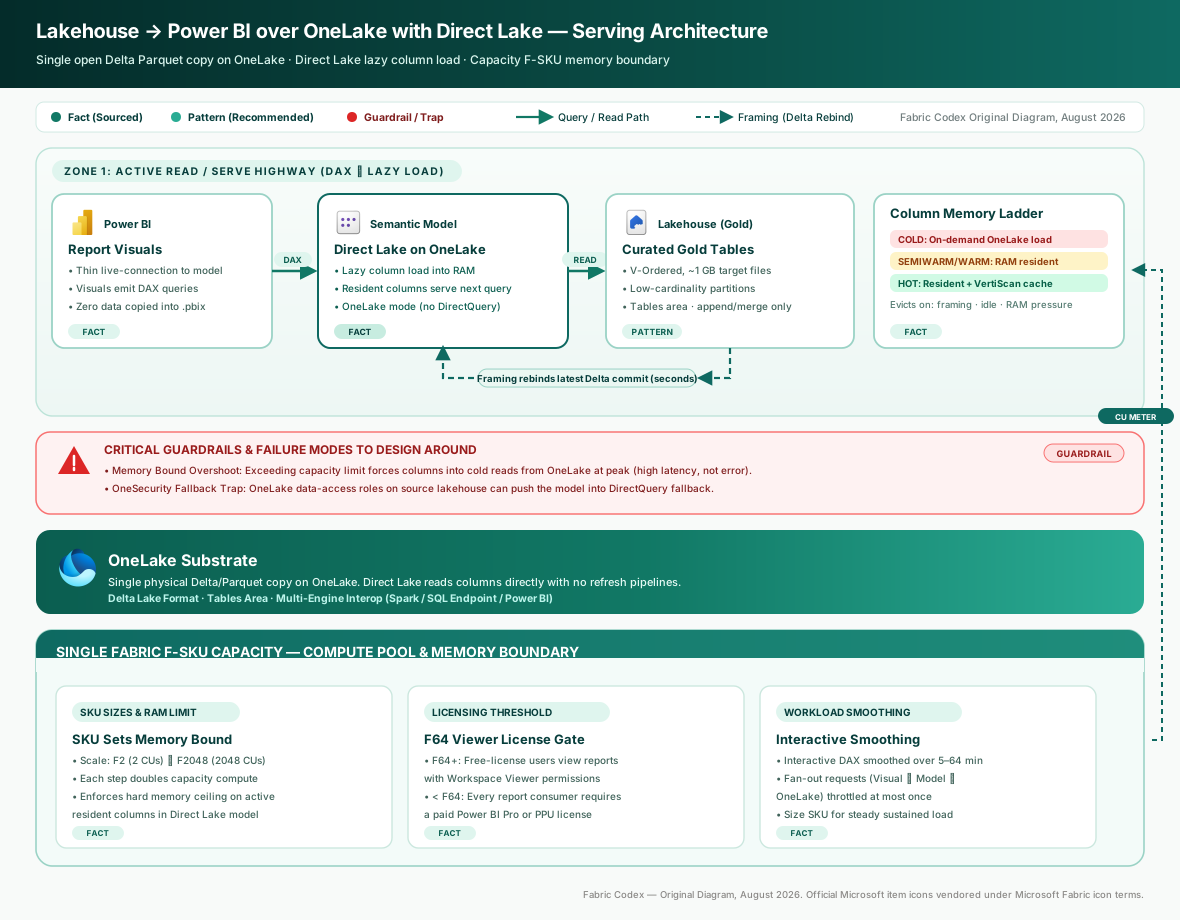
OneLake is the single, unified, logical data lake for the whole tenant, provisioned automatically with every Fabric tenant [S1]. A lakehouse stores its tables as Delta/Parquet in OneLake, giving one physical copy that every Fabric engine can read [S2]. This is the foundation that lets reporting avoid a second copy of the data — the same gold-layer Delta tables a Spark job writes are the tables the semantic model reads.
2. Serving: Direct Lake semantic model#
Direct Lake loads Parquet-format column data directly from OneLake into the semantic model engine's memory, instead of querying a database or importing a refreshed copy [S3]. This gives the query performance of an import model while reading the data that currently sits in the lakehouse [S3]. Architecturally, choose Direct Lake on OneLake over Direct Lake on SQL for a pure BI-serving design: OneLake APIs alone handle schema discovery, security, and data loading with no SQL analytics endpoint in the path, which means one fewer security boundary to cross on every query and a simpler DAX query plan [S5].
Inference: Because there is no scheduled import/refresh, report freshness tracks the lakehouse tables as they are written, which removes a class of refresh-orchestration failures from the design — but it also means write-side hygiene (below) directly determines read-side query performance, where an import model would have insulated reports from messy source-table layout.
3. Capacity sizing#
The capacity SKU sets the maximum memory available to each Direct Lake semantic model, which bounds how much column data can be resident at once [S4]. Larger SKUs allow more column data to stay in memory, reducing cold-read fallbacks [S4].
Inference: For a large model, SKU selection here is a memory sizing decision as much as a compute one — under-sizing shows up as cold reads from OneLake at peak, not as outright failure. Size against the model's resident column footprint (the columns reports actually query, not full table width) rather than raw table size on disk.
Decision: storage mode and capacity sizing#

Direct Lake is the recommended default for this scenario over the two alternatives: Import copies and refreshes data on a schedule, reintroducing the duplication and staleness this design exists to avoid; DirectQuery forwards every visual to the source live, trading freshness for query latency that Direct Lake avoids by residing column data in memory [S3]. Direct Lake pairs import-like speed with DirectQuery-like freshness and no copy step.
Once Direct Lake is chosen, size the capacity SKU against two independent pressures: whether the model's resident column footprint fits under the SKU's memory bound [S4], and whether broad free-license report viewing volume pushes toward F64 or larger regardless of raw model size — the free per-user Fabric license only permits creating and sharing items on an F or Trial capacity, so wide anonymous/free-tier report consumption is itself a capacity-sizing input, not just a licensing checkbox.
Implementation guardrails#
- Keep the model's resident column footprint under the SKU memory bound [S4]; otherwise queries fall back to reading columns from OneLake on demand rather than serving from memory.
- Lakehouse tables must be in the Delta/Parquet form Direct Lake can map [S2] [S3].
- Target Delta partition columns under roughly 100–200 distinct values to avoid over-partitioning [S6] — over-partitioning inflates the row-group count Direct Lake has to transcode.
- Use Optimized Write with a 1 GB BinSize target for tables backing a Direct Lake model [S7] — this is the recommended write-side file size, not merely a general Delta best practice.
- Prefer
append/MERGEoveroverwriteon write, and keep table history/vacuum retention longer than the framing cadence so in-flight framing operations aren't left pointing at a Delta version that's already been vacuumed away. - Confirm Block Public Internet Access is off, or explicitly designed around, before rollout — private-link and public-access configuration affects OneLake/Direct Lake reachability and is an easy late-stage surprise if decided after the model is built.
Source legend#
| # | Source | Tier |
|---|---|---|
| S1 | OneLake, the OneDrive for data | 1 — Microsoft Learn |
| S2 | What is a lakehouse in Microsoft Fabric? | 1 — Microsoft Learn |
| S3 | How Direct Lake works | 1 — Microsoft Learn |
| S4 | Understand your Fabric capacity throttling | 1 — Microsoft Learn |
| S5 | Direct Lake overview — develop | 1 — Microsoft Learn |
| S6 | Understand storage for Direct Lake semantic models | 1 — Microsoft Learn |
| S7 | Optimized Write in Fabric (Miles Cole) | 4 — MVP/community |
Internals#
Architecture & design#
Direct Lake on OneLake is defined by what it doesn't do: no ETL pipeline copies data into the model, and no live SQL round trip serves every visual. The semantic model's shared expression points straight at OneLake storage, and the engine performs on-demand column loading against OneLake directly [S5]. For this design specifically, that architectural choice is what removes the SQL analytics endpoint from the query path entirely — schema discovery, security checks, and data loading all resolve through OneLake APIs, so a report query crosses one fewer security boundary than the Direct Lake on SQL alternative would require [S5].
How it works internally#
Query performance in this design hinges on transcoding — converting the Parquet-encoded column data the lakehouse writes into the in-memory columnar format the DAX engine queries against. A model occupies one of four memory-residency states (cold, semiwarm, warm, hot), with latency improving at each step [S6]. On a cold query the engine merges per-row-group Parquet dictionaries into a single global dictionary, so a table with more, smaller row groups takes longer to transcode — which is exactly why the write-side guardrails above (1 GB BinSize, sensible partitioning) aren't generic Delta hygiene here, they're the mechanism that keeps this specific BI-serving design fast [S6]. Row-group count maps one-to-one to in-memory column segments; the engine performs best with segments of roughly 1–16 million rows, and segments well under 1 million rows are the failure mode this design's write guardrails exist to prevent [S6].
Performance characteristics#
The verified numbers relevant to sizing this design are structural guardrails, not throughput or latency benchmarks: partition columns under roughly 100–200 distinct values [S6], column segments of roughly 1–16 million rows for large tables [S6], a 1 GB Optimized Write BinSize target [S7], and framing operations failing outright once a table exceeds 10,000 Parquet files [S5] — the last of these is a hard operational ceiling worth tracking explicitly as a lakehouse serving this pattern grows.
Coming soon — quantified latency/throughput benchmarks (measured cold-vs-hot query times for a BI workload specifically, or capacity-unit consumption under concurrent report load) aren't in the knowledge base yet for this scenario. It needs an L4/L5 source such as a Microsoft engineering blog or benchmark publishing measured Direct Lake query latency under realistic BI concurrency. Tracked in content/queue.md.