What Direct Lake actually does#
A Power BI semantic model needs a storage mode — a strategy for getting data. Direct Lake reads Delta tables straight from OneLake, skipping both a data import and a live DirectQuery pass-through, pairing import-like query speed with DirectQuery-like freshness [S1]. Your report queries OneLake data directly, with no import and no separate cache to maintain [S2]. It runs on the Analysis Services engine, delivering import-mode speed without maintaining a copied dataset — a third option alongside the older import and DirectQuery modes, not a replacement for either [S3].
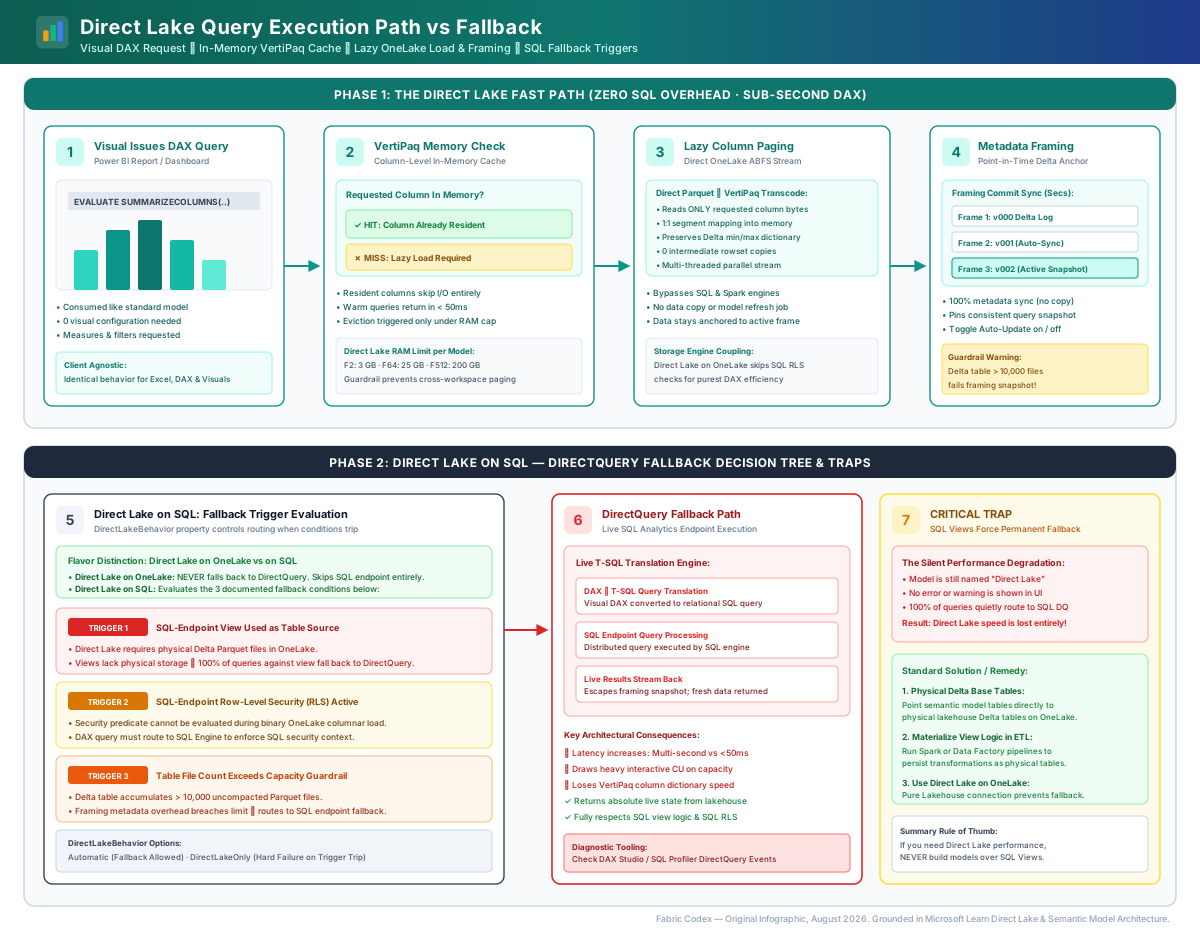
How a query reaches your data#
Direct Lake doesn't preload anything. Column data loads from OneLake lazily: nothing is read until a query first touches that column, and the load set includes columns needed by relationships and measures, not just the ones a visual names directly [S4]. An automatic-updates setting, on by default, reframes Direct Lake tables whenever the underlying OneLake data changes; turn it off to control visibility yourself through manual or scheduled framing instead [S4].
For example, a visual filtering by region and summing revenue loads only the region and revenue columns (plus anything a measure touches) on its first query [S4]. If someone updates the source table afterward, automatic updates reframes the model so the next query sees the change with no manual refresh step [S4].
Two flavors, two creation paths#
Direct Lake comes in two flavors: Direct Lake on OneLake, with OneLake security, richer modeling features, and faster queries; and Direct Lake on SQL, needed for SQL-endpoint security under delegated identity or when DirectQuery fallback is required [S5]. This matters at creation time — Power BI Desktop and the Power BI service only ever create Direct Lake on OneLake models; the SQL analytics endpoint page is the one path that offers both flavors [S5]. Beyond the browser, models can also be built with XMLA-compliant tools such as SSMS 19.1+, community tooling, or programmatically from Fabric notebooks via semantic link and semantic-link-labs [S5].
Put simply, Direct Lake avoids the import-and-refresh cycle traditional import-mode models require, while still reading live from the lake [S6].
What goes wrong#
- Expecting instant visibility after turning off automatic updates. Stale data is expected until the next manual or scheduled framing — not a bug [S4].
- Building in Desktop and expecting a SQL-flavor model. Desktop and the Power BI service only create Direct Lake on OneLake; the SQL flavor requires the SQL analytics endpoint page [S5].
- Assuming "direct" means everything loads at once. Only the columns a query, its relationships, and its measures actually touch are loaded — the rest of the table stays untouched [S4].